fripos.app › English › VAT
What FriPos does when your restaurant is registered for VAT: receipts, full tax invoices, the cash-up and the sales reports. Every picture and file on this page was made with FriPos for one sample day at a sample restaurant: four bills, ฿4,280 in total, paid in cash, by card and by PromptPay.
ภาษาไทย: FriPos สำหรับร้านอาหาร ที่จด VAT
In the admin screen, open Settings. On the "Shop" card, enter your Tax ID in "Tax ID (13 digits)", tick "Shop is VAT-registered (Por Por 20) — enable abbreviated tax invoices" and tap Save. From then on:
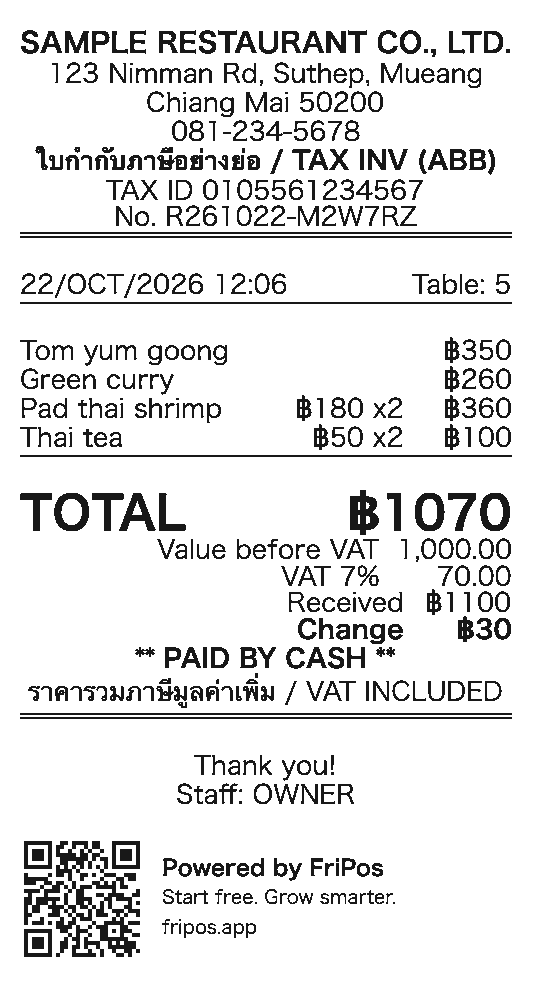
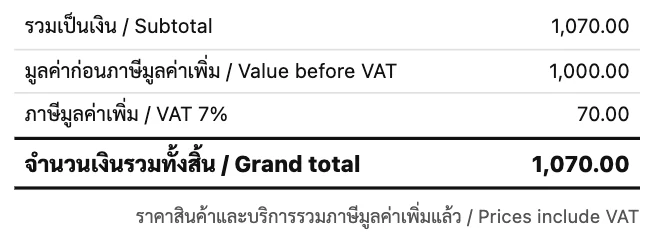
The sample day on this page has four bills: table 5 (฿1,070 in cash), table 2 (฿1,070, split into ฿500 in cash and ฿570 by PromptPay), table 8 (฿1,605 by card) and table 3 (฿535 by PromptPay). For the bill of table 5, ฿1,070: VAT = 1,070 × 7 ÷ 107 = 70.00, and the value before VAT is 1,000.00. For the whole day, the VAT is 280.00 and the value before VAT is 4,000.00.
Manual: Shop name, logo & receipt info
The receipt of a VAT-registered shop is an abbreviated tax invoice. At the top it shows "TAX INV (ABB)" in Thai and English, your Tax ID and a receipt number. If you don't add tax on top of your prices, two lines under TOTAL show "Value before VAT" and "VAT 7%". If you add tax on top of your prices, the lines go in this order: "Subtotal" (the food total), "Service Charge", "VAT 7%" (in whole baht) and "TOTAL" (Android app: coming in the next version).
When guests split the bill, each payment gets its own receipt with its own number, and the VAT on each receipt is worked out on that payment. Here the bill of table 2, also ฿1,070, is paid as ฿500 in cash and ฿570 by PromptPay: VAT 32.71 and VAT 37.29. The two add up to 70.00, the same as for the bill of table 5.
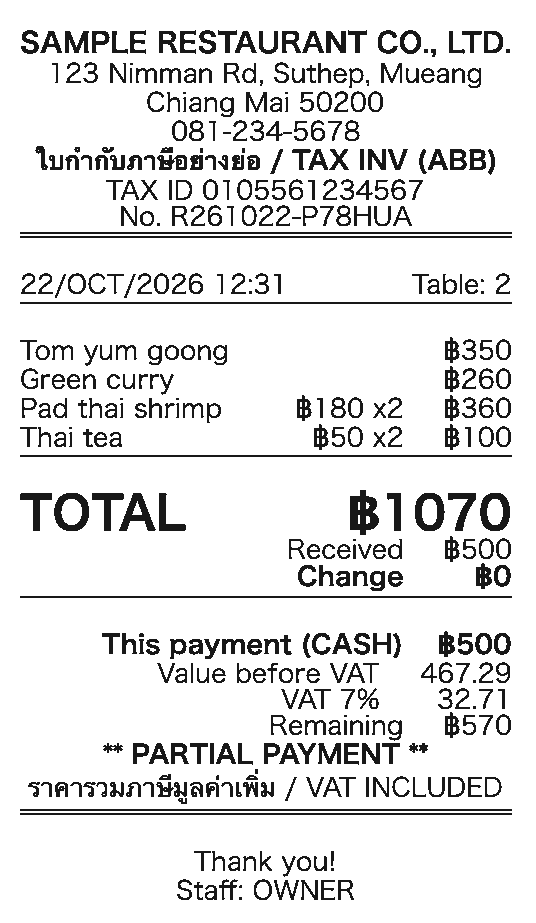
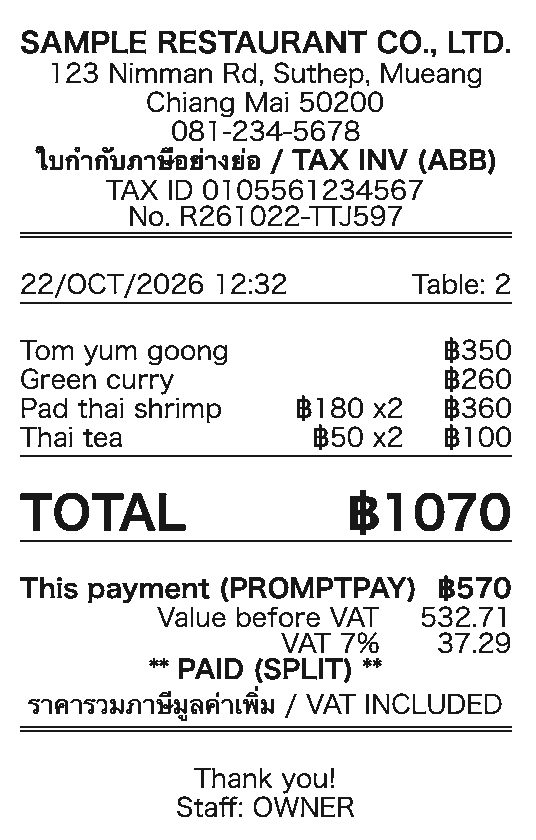
These pictures are drawn from exactly what the FriPos Android app (version 259) sends to the receipt printer. Receipts printed from the browser version have the same VAT lines.
Manual: Receipts · Split the bill
When a customer asks for a full tax invoice, open the paid bill (on the register: ⋮ > "Today’s orders", or in the admin screen: "Receipt records") and tap "Full tax invoice". Enter the customer's company name, address and Tax ID, or take a photo of their business card or company document and FriPos's AI fills them in. Check them and tap "Issue tax invoice". Full tax invoices are part of the Starter plan and the plans above it.
This is the full tax invoice for the bill of table 5 (฿1,070), issued to a sample company. It has its own running number for the month (IV2610-0001), the number of the receipt as the reference, and the VAT shown separately from the price. It opens as an A4 PDF that you can print or save, and the Android app can also print it on the receipt printer.
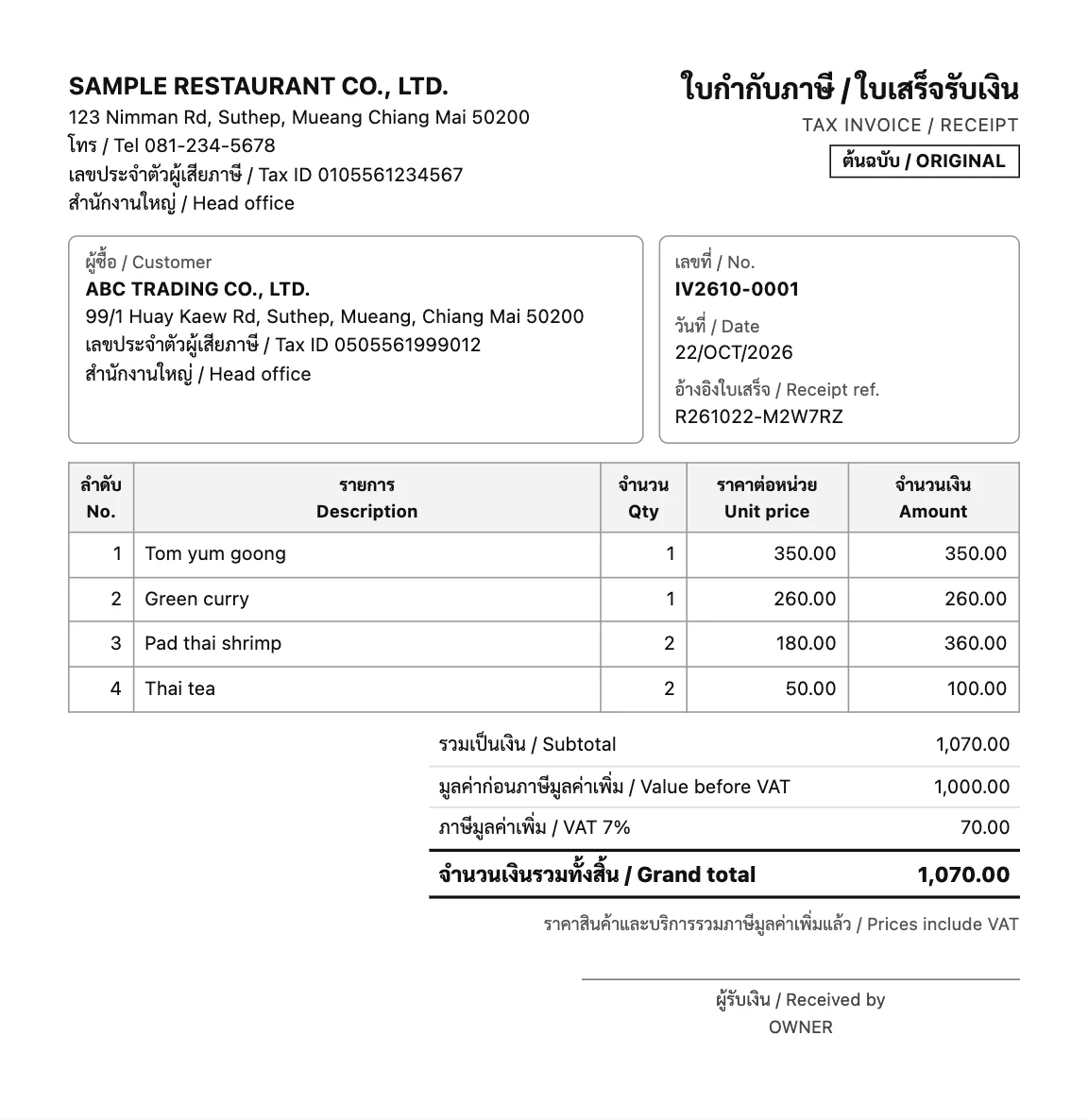
Download the sample invoice as a PDF (A4, 1 page, 178 KB)
Manual: Full tax invoices
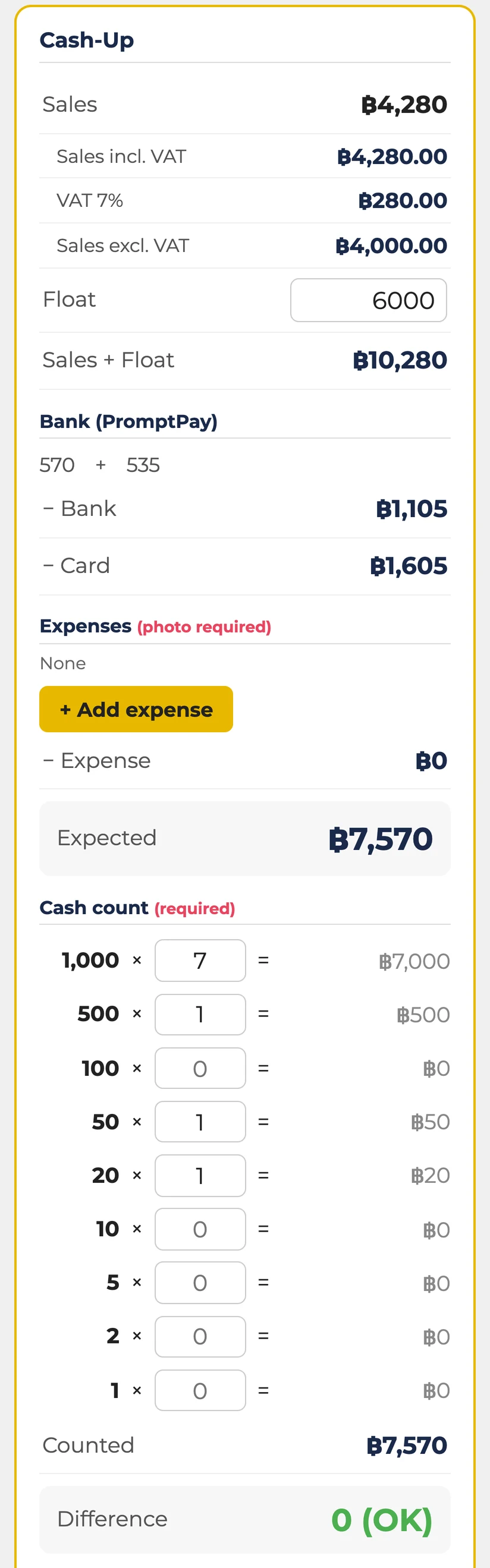
At closing, the cash-up screen shows three more lines right under "Sales": "Sales incl. VAT", "VAT 7%" and "Sales excl. VAT". The printed cash-up report shows the same three lines in its summary.
The cash-up also shows the totals for each way of paying. The PromptPay payments ("− Bank", ฿1,105) and the card payments ("− Card", ฿1,605) are taken off "Sales + Float", which leaves the cash that should be in the drawer ("Expected", ฿7,570: ฿1,570 paid in cash and the ฿6,000 float). When you enter the notes and coins under "Cash count", the screen shows "Counted" (฿7,570) and "Difference" (0). The printed cash-up report shows the same lines.
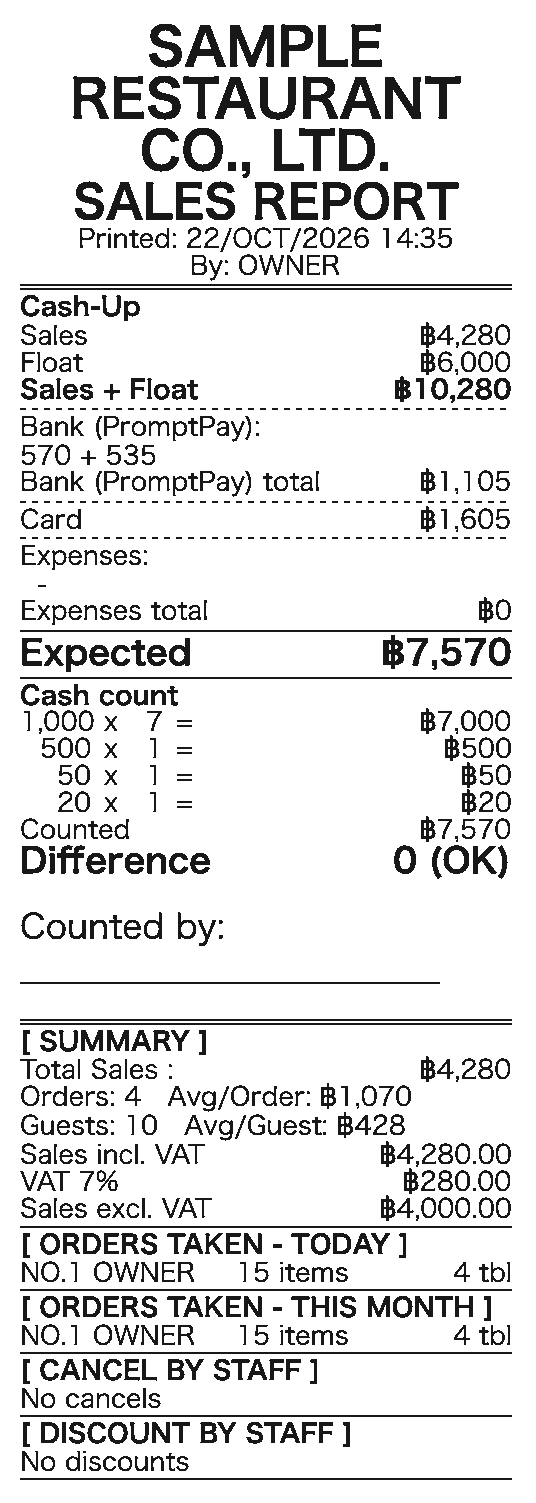
When you close, the daily report on LINE shows the same three lines. They are also in last month's summary that comes with the first report of each month.
Manual: Cash-up · The daily report
In the admin screen, go to Sales and open "Sales board". For the period you choose, the breakdown has a "VAT 7%" row and a "Sales excl. VAT" row. "Net sales (received)" is the money received, with VAT included. The "Payment methods" card shows the sales for each way of paying.
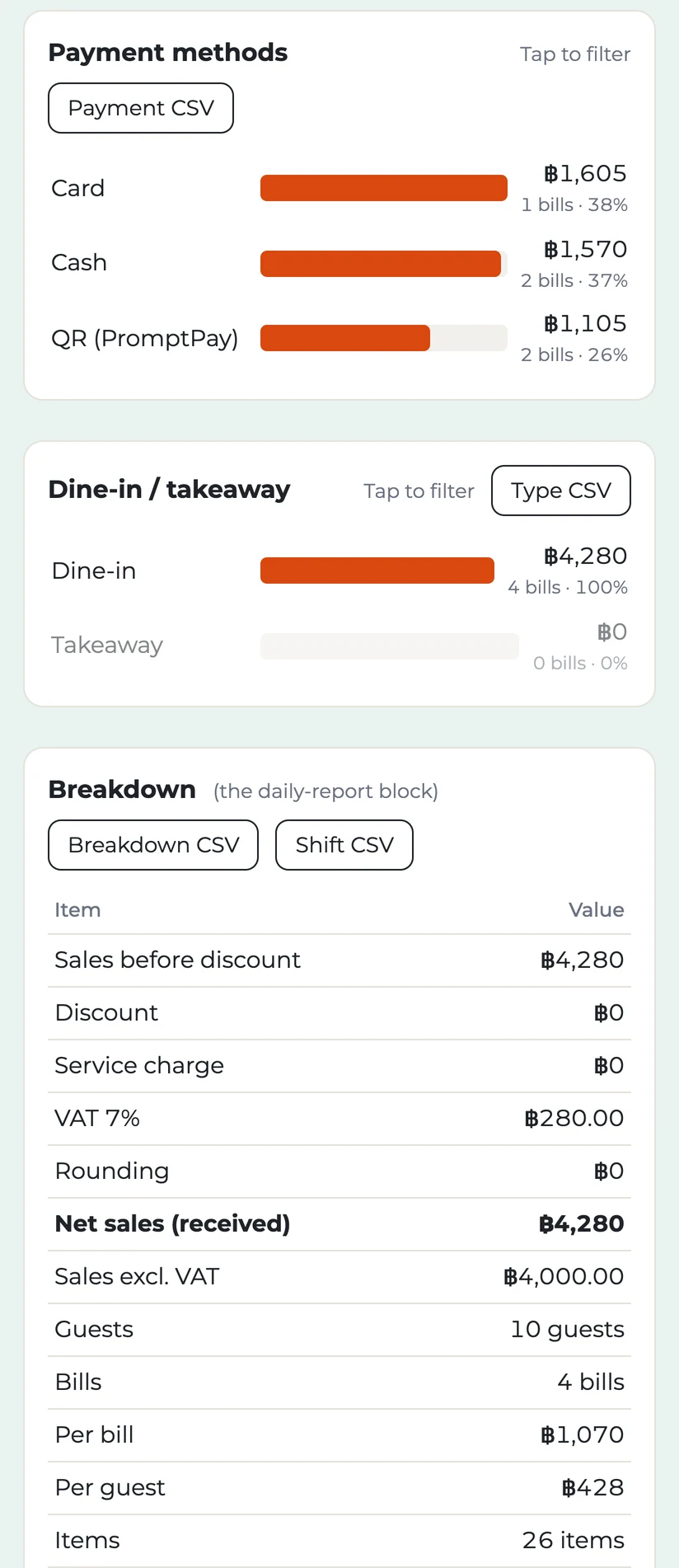
The VAT on the cash-up, the sales board, the LINE daily report and the CSV files is the VAT of each receipt added up, so the totals match your receipts.
Manual: Sales board
Each table on the sales board can be downloaded as a CSV file ("Breakdown CSV", "Day CSV", "Bill CSV" and the others). For a VAT-registered shop, the files have a "VAT 7%" column and a "Sales excl. VAT" column. The two files below are the ones FriPos made for the sample day, unchanged. Each file ends with the conditions it was made with (the period, what was left out, and when it was made). The Bill CSV has one row for each bill, newest first; the tables below show two bills at a time.
| Column | Value |
|---|---|
| Day | 2026-10-22 |
| Sales | 4280 |
| VAT 7% | 280 |
| Sales excl. VAT | 4000 |
| Bills | 4 |
| Comparison day | (empty) |
| Sales on the comparison day | (empty) |
Download fripos-sample-by-day.csv
| No. | 13 | 12 |
|---|---|---|
| Day | 2026-10-22 | |
| Time | 13:18 | 13:02 |
| Table | 3 | 8 |
| Type | Dine-in | |
| Guests | 2 | 4 |
| Staff | OWNER | |
| Payment | QR (PromptPay) | Card |
| Items | 5 | 9 |
| Before discount | 535 | 1605 |
| Discount | 0 | |
| Service charge | 0 | |
| Tax | 0 | |
| Rounding | 0 | |
| Sales | 535 | 1605 |
| VAT 7% | 35 | 105 |
| Sales excl. VAT | 500 | 1500 |
| No. | 11 | 10 |
|---|---|---|
| Day | 2026-10-22 | |
| Time | 12:32 | 12:06 |
| Table | 2 | 5 |
| Type | Dine-in | |
| Guests | 2 | |
| Staff | OWNER | |
| Payment | Cash + QR (PromptPay) | Cash |
| Items | 6 | |
| Before discount | 1070 | |
| Discount | 0 | |
| Service charge | 0 | |
| Tax | 0 | |
| Rounding | 0 | |
| Sales | 1070 | |
| VAT 7% | 70 | |
| Sales excl. VAT | 1000 | |
Download fripos-sample-by-bill.csv
Manual: Sales board
Questions: the FriPos LINE chat https://lin.ee/sJ6Ep6o
